- Shorts live or die in the first second — the hook is the whole game.
- Vertical 9:16, fast cuts, and burned-in captions are non-negotiable in 2026.
- Loopable endings and high retention are what the algorithm rewards most.
- Editing for muted, swipe-happy viewers is a different craft from long-form.
YouTube Shorts reward a completely different editing style from long-form video. Watch time per second matters more than total length, the first frame decides whether anyone stays, and the viewer's thumb is always hovering over the next video. Editing a Short is less like cutting a film and more like designing a trap that grabs attention instantly and refuses to let go. This guide covers the editing choices that actually move retention on Shorts in 2026, building on the broader principles in our YouTube editing guide. For the platform's own rules and specifications, the official YouTube Help Center is the authority.
The First-Second Hook
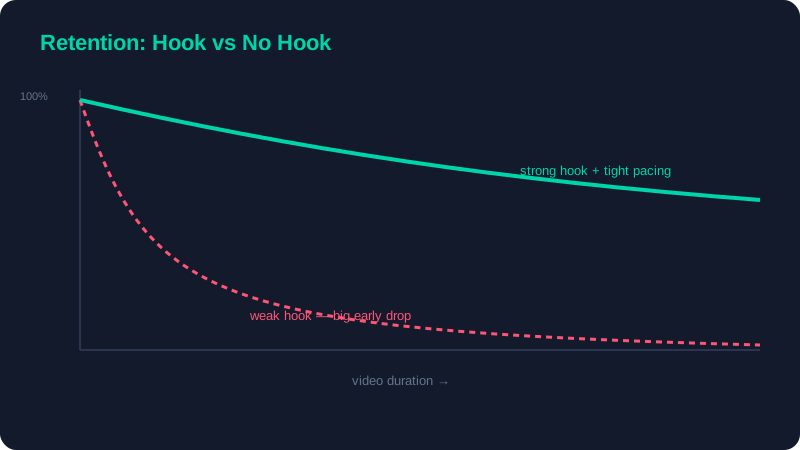
On Shorts you have less than a second before a viewer decides to swipe. That means the slow build-up that works in long-form is fatal here. Open on the most visually arresting frame you have, or on the payoff itself, and explain afterwards. Never open with a logo animation, a slow establishing shot, or "hey guys, welcome back". Show the result, the surprise, the transformation, or the question immediately — give the viewer a reason to stay before they have time to leave.
A useful test: watch your first second with the sound off and ask whether it alone would stop you scrolling. If it would not, re-cut the opening until it does. The single biggest lever on a Short's performance is the strength of that opening frame.
Format, Framing, and Captions
Vertical, full-frame, captioned
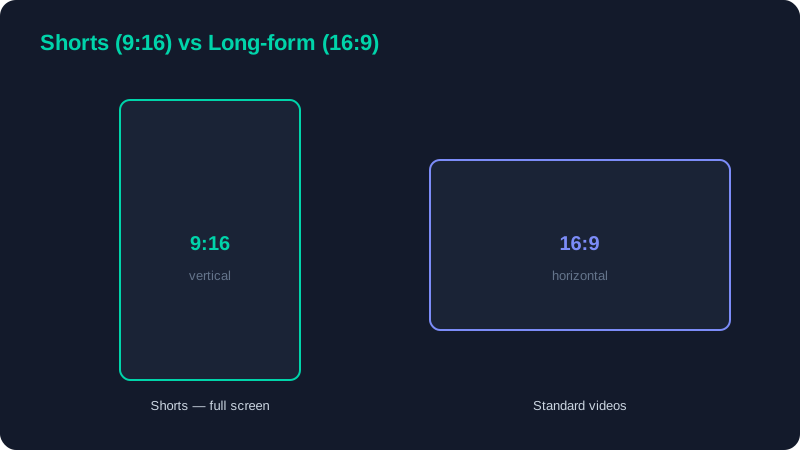
- 9:16 vertical filling the entire screen — no black bars, no letterboxing, no horizontal footage shrunk into the middle.
- Burned-in captions — the majority of viewers watch with sound off, so on-screen text is essential, not optional.
- Safe zones — keep text and key action clear of the bottom progress bar and the right-side interaction buttons, which cover part of the frame.
Pacing for Retention
Shorts tolerate — and actively reward — far faster cutting than long-form. Trim every pause to the frame, and aim to change the visual every one to two seconds through a cut, a zoom, a text beat, or a camera move. The goal is that the viewer's eye never has a moment of boredom in which to look away. Use the audio-led editing approach from our advanced techniques guide to cut on the beat of your music or voiceover, which keeps the pace feeling musical rather than frantic.
That said, fast does not mean chaotic. The cuts still need to be motivated and the story still needs to be clear. A Short that is merely a blur of rapid cuts with no through-line will lose viewers just as fast as a slow one. Speed serves clarity, not the other way around.
Shorts vs Long-Form at a Glance
| Element | Shorts | Long-form |
|---|---|---|
| Aspect ratio | 9:16 vertical | 16:9 horizontal |
| Hook window | Under 1 second | First 5–15 seconds |
| Cut frequency | Every 1–2 seconds | Every 5–15 seconds |
| Captions | Always burned-in | Optional |
| Ending | Loopable | Outro and call to action |
| Primary metric | Retention per second + loops | Total watch time |
Edit the last second to flow seamlessly into the first, so the Short loops invisibly. Each accidental re-watch counts as extra watch time, which is exactly what the algorithm measures — a clean loop can push average view duration above 100% of the video's length.
The Loop Ending
Ending on a frame that matches your opening turns a single view into multiple. Because Shorts auto-replay, a viewer who does not consciously notice the video has restarted will watch again, and that repeated watch time is a strong positive signal. Plan the loop from the start: choose an opening frame you can return to, and avoid hard endings like a fade to black or a "thanks for watching" card that breaks the cycle. The most-shared Shorts almost always loop.
Sound and Captions for Muted Viewing
Design every Short to work twice: once muted and once with sound. Muted is the default, so the captions and visuals must carry the entire message on their own. But the minority who do turn sound on should be rewarded with crisp audio, a driving music bed, and well-timed sound effects that punctuate the cuts. Burn captions in rather than relying on auto-generated ones at playback, style them consistently and large, and always proofread them, since a misspelled word in giant on-screen text is far more noticeable than in a long-form video.
Shorts are a craft of their own, but they share a spine with everything else on the platform: a strong hook, tight pacing, and respect for the viewer's attention. Master those here and they will improve your long-form work too. To turn out Shorts quickly and consistently, continue with our speed workflow guide, and for the complete picture, return to the YouTube editing guide.