- Most "amateur" looking videos share the same handful of fixable mistakes.
- Overusing transitions and effects is the single most common giveaway.
- Audio and pacing problems lose viewers faster than any visual flaw.
- Fixing these costs no new skills — just discipline and a final review pass.
After reviewing hundreds of beginner edits, the same mistakes appear again and again — and the encouraging news is that almost every one is quick to fix without learning a single new effect. These are not advanced problems; they are habits. Clean them up and your videos will jump a visible tier in perceived quality. This guide explains each mistake, why it reads as amateur, and exactly how to fix it, and it pairs naturally with the structured practice in our 30-day beginner roadmap.
1. Overusing Transitions and Effects
The fastest way to look like a beginner is to place a transition between every single clip. Spins, zooms, page-curls, and star wipes draw attention to the edit itself, which is exactly the opposite of what you want. Professionals use hard cuts for the overwhelming majority of edits and reserve transitions for a clear purpose — a dissolve to signal passing time, a wipe to shift location. The rule is simple: if a transition is not doing a specific narrative job, delete it and use a hard cut.
2. Ignoring Audio
Viewers will forgive slightly soft focus, but they will not forgive harsh, unbalanced, or noisy audio — they simply leave. Set dialogue or narration to a consistent level throughout, keep music comfortably below it, and add short fades to the start and end of every audio clip so sound never pops in or out abruptly. If your recording has background hiss, a single noise-reduction pass works wonders. Audio is the area where a small amount of attention produces the largest jump in perceived professionalism.
3. Letting Clips Run Too Long
Beginners habitually hold shots well past the moment they have made their point, and the result feels slow and self-indulgent. Train yourself to cut earlier than feels comfortable. If a clip delivers its information in two seconds, do not give it five. This single adjustment — trimming the back half of shots once they have done their job — tightens pacing more than any other change and is the same discipline professionals apply, as covered in our advanced techniques guide.
4. Cutting in the Wrong Places
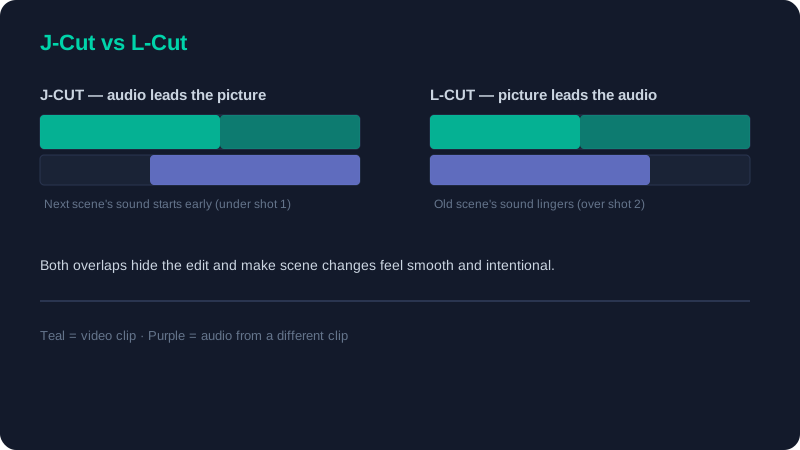
Where you cut matters as much as how long you hold. Cutting on stillness — in the middle of a held pose or a pause — draws attention to the edit. Cutting on motion, such as a head turn or a hand movement, hides it. The J-cut and L-cut, where audio leads or trails the picture, smooth scene changes further by overlapping the senses so the join is never abrupt.
5–10. Six More Quick Fixes
| Mistake | The fix |
|---|---|
| Inconsistent fonts and colors | Pick one font and one accent color and reuse them everywhere |
| Loud, sudden music starts | Fade music in and out; duck it under the voice |
| Mismatched exposure between shots | Do basic color correction before any creative grading |
| Default zoom or pan on every photo | Use movement only when it adds meaning, not by reflex |
| Text that is too small or too brief | Make on-screen text large and leave it long enough to read twice |
| Never watching the full export | Always review the final file start to finish before publishing |
Before you export, watch the video once with the sound muted, then once with your eyes closed listening only to the audio. Problems you completely miss while doing both at once — a jarring cut, a music swell over dialogue, a level that drifts — become obvious the moment you separate the senses.
11. Skipping the Review Pass
The final and most overlooked mistake is publishing without a proper review. Every problem above is catchable in a few minutes of deliberate checking, yet most beginners export and upload immediately, errors and all. Build a simple checklist — audio levels consistent, no accidental transitions, text readable, color matched, no dead air — and run through it on the exported file, not the timeline, since export can occasionally introduce its own surprises.
None of these fixes require new technical skill; they require attention and a little discipline. Avoiding them is really about building good habits early, which is exactly what a structured practice routine instils. Work through the basics guide to lock in the fundamentals that prevent most of these mistakes, follow the 30-day roadmap to make the good habits automatic, and your edits will already look more professional than the majority of beginner work online.