- Free editors are no longer "lite" — DaVinci Resolve's free tier is genuinely professional.
- You pay mainly for ecosystem integration, support, and specific pro features, not raw editing power.
- Calculate cost over three years, including subscription creep, before committing to any tool.
- The quality of a video comes from decisions, not from the price of the software.
"Should I pay for video editing software?" is the most common question new editors ask, and the honest answer in 2026 has genuinely changed. A decade ago, free tools were limited, watermarked, or crippled in ways that pushed serious work toward paid suites. Today the gap has narrowed so far that paying is a deliberate trade-off rather than a necessity. This guide breaks down exactly what your money buys, with a realistic three-year cost comparison, so you can decide based on your actual needs rather than marketing. For AI-specific capabilities, read it alongside our AI software guide.
What You Actually Pay For
Paid editors rarely beat free ones on the core act of cutting video. What the money buys is usually one or more of the following:
- Ecosystem integration — seamless round-tripping with motion graphics, design, and stock-media libraries from the same vendor.
- Support and predictable updates — guaranteed fixes, documentation, and a steady release cycle.
- Specific pro features — advanced multi-user collaboration, certain professional codecs, or studio-grade color and audio tools.
- Cloud and team features — shared projects, review tools, and asset management for studios.
If your work does not depend on those things, a free editor may cover everything you need with no compromise on output quality.
What You Get for Free
The free tier of DaVinci Resolve is the clearest example of how far free has come. It includes multi-track editing, professional node-based color grading, a full audio suite, visual effects, and motion graphics — with no watermark and no time limit. It is used on real professional projects, not just hobby edits. For short-form and social content, CapCut offers fast captioning, templates, and auto-reframe at no cost. And the open-source Blender includes a capable video sequence editor alongside its renowned 3D tools. The practical upshot: a complete beginner can learn, produce, and even take on paid client work without spending a cent on software.
Three-Year Cost Comparison
The clearest way to compare options is total cost over a realistic ownership period. Three years is a fair window, since most creators keep a primary editor at least that long.
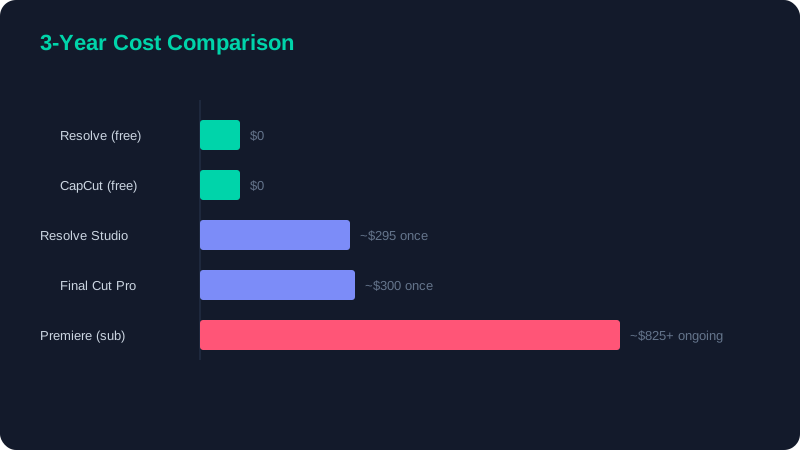
| Software | Pricing model | 3-year cost | Notes |
|---|---|---|---|
| DaVinci Resolve (free) | Free | $0 | Professional tier, no watermark |
| CapCut (free) | Free / optional Pro | $0+ | Best for short-form and social |
| DaVinci Resolve Studio | One-time licence | ~$295 | Pays for itself versus subscriptions |
| Final Cut Pro | One-time licence | ~$300 | Mac only, very efficient |
| Adobe Premiere Pro | Subscription | ~$825+ | Ongoing monthly fee, access ends if you stop |
The Subscription Trap
The defining difference between models is not capability but ownership. With a one-time licence, you pay once and keep the software, including the version you bought, for as long as your computer runs it. With a subscription, you are renting access: the moment payments stop, so does your ability to open the application — and often your projects with it. Over three years a subscription editor can cost several times what a comparable one-time licence costs, and that gap only widens with time.
Start free. Learn on DaVinci Resolve or CapCut for a few months, hit a specific wall that the free tool genuinely cannot clear, and only then pay to solve that exact problem. The overwhelming majority of creators never hit such a wall, and those who do usually find a one-time licence solves it permanently.
How to Choose
Match the tool to your situation rather than to its reputation:
Choose free if…
You are learning, creating for yourself, building a portfolio, or producing social and short-form content. DaVinci Resolve's free tier or CapCut will not hold you back.
Choose a one-time licence if…
You edit regularly, want guaranteed pro features and support, and prefer to avoid recurring fees. DaVinci Resolve Studio or Final Cut Pro typically pay for themselves within a year compared with a subscription.
Choose a subscription only if…
You genuinely live inside that vendor's ecosystem — for instance, round-tripping to motion-graphics software daily, or collaborating in a team that standardises on it. For everyone else, the recurring cost outweighs the benefit.
The bottom line is liberating: software is no longer the barrier to making great video. Your editing decisions, not your subscription, determine the result. If you are just starting out, begin with the beginner tips guide before spending anything, and let your skills — not a price tag — lead the way.