- AI now handles transcription, rough cuts, captioning, and masking well — but rarely the creative decisions.
- The best 2026 setup pairs a traditional editor with targeted AI tools, not one all-in-one "AI editor".
- Always review AI captions and auto-cuts; accuracy is high but never perfect, and errors break trust.
- Free tools like DaVinci Resolve and CapCut offer the most useful AI features at no cost.
AI has moved from novelty to genuine time-saver in video editing, but the marketing has raced far ahead of what the tools actually deliver. After testing the major options across real client projects over the past year, the conclusion is straightforward: AI is excellent at the tedious work — transcribing, captioning, removing silences, isolating subjects — and still weak at the work that matters most, which is taste. This guide breaks down where AI editing tools genuinely help in 2026, where they fall short, and how the leading options compare, so you can build a workflow that uses AI for leverage without handing it decisions it cannot make. It pairs naturally with our broader software comparison.
What AI Editing Can and Cannot Do
It helps to separate AI features into two honest buckets, because conflating them is how creators end up disappointed. AI is a superb assistant and a poor director. It can move pixels and process audio at superhuman speed, but it has no understanding of why a particular pause is dramatic or why holding a reaction shot one extra second makes a joke land.
Where AI genuinely saves time
- Text-based editing: edit video by deleting words in an automatically generated transcript.
- Auto-captions: fast, mostly accurate subtitles that you then proofread.
- Silence and filler removal: strips "ums", "uhs", and dead air automatically.
- Subject masking: rotoscoping and background removal that used to take hours, done in a click.
- Auto-reframe: converting horizontal footage to vertical by tracking the subject.
Where AI still falls short
- Pacing and emotional rhythm — knowing exactly how long to hold a shot.
- Story structure — deciding what to cut for meaning rather than just for silence.
- Brand-accurate color and intentional sound design.
- Taste — the thousand small judgements that make an edit feel human.
The AI Features Worth Using
Of everything marketed as "AI editing", a handful of features deliver real, repeatable value. Text-based editing is the standout for anyone working with talking-head or interview footage: instead of scrubbing a timeline, you read a transcript and delete sentences, and the matching video disappears. For long-form creators this can cut assembly time dramatically. Voice isolation and speech enhancement are the next most useful, rescuing audio recorded in imperfect conditions. Magic-mask style subject selection turns what was once specialist rotoscoping work into a routine task. Everything beyond these is worth treating with healthy scepticism until you have tested it on your own footage.
2026 AI Tool Comparison
The four tools below cover the realistic options for most creators, from free professional suites to fast social-first apps.
| Tool | Best AI feature | Price | Best for |
|---|---|---|---|
| DaVinci Resolve | Voice isolation, magic mask, smart reframe | Free / ~$295 one-time | Editors who want AI inside a full pro suite |
| Adobe Premiere Pro | Text-based editing, enhance speech | Subscription | Transcript-driven long-form editing |
| CapCut | Auto-captions, auto-reframe for shorts | Free / Pro | Fast social and short-form turnaround |
| Descript | Edit video by editing a document | Subscription | Podcasters and talking-head creators |
Pricing and feature sets change frequently, so confirm current details on each vendor's own site, such as Adobe Premiere Pro and CapCut, before committing. For a deeper look at the recurring cost of subscription editors versus one-time licences, see our free vs paid breakdown.
A Practical AI-Assisted Workflow
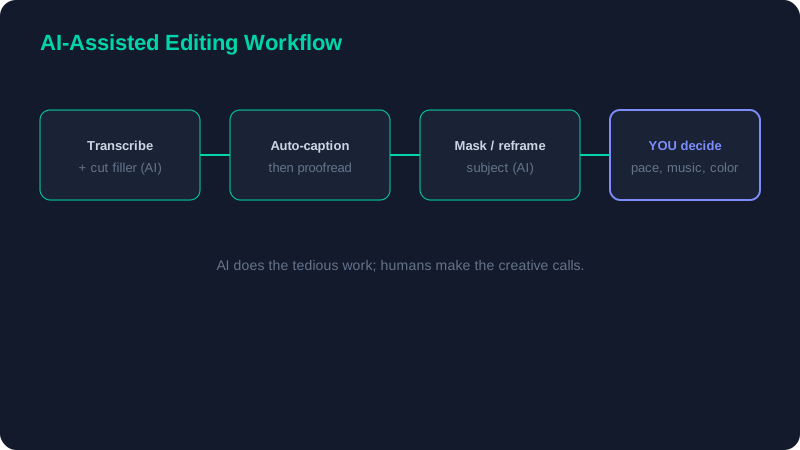
The most efficient 2026 setup is not a single "AI editor" that promises to do everything. It is a traditional timeline with AI applied to specific, well-chosen steps where it genuinely saves time.
- Transcribe the footage and remove filler words and long pauses using text-based editing.
- Auto-caption the rough cut, then proofread every line for names, jargon, and brand terms.
- Use subject masking for any background swaps, punch-ins, or selective grading.
- Make every creative decision yourself — pacing, music, sound design, and color.
This division of labour is the whole point: AI clears away the hours of mechanical work so your limited creative energy goes where it actually counts. The pacing and grading judgement in our advanced techniques guide is exactly the part you should keep for yourself.
AI captioning is fast but never 100% accurate on proper nouns and technical terms. A single wrong word in a caption quietly undermines a viewer's trust in everything else you say, so always read captions back in full before publishing — it takes minutes and protects your credibility.
Pitfalls to Watch For
The failure modes of AI editing are predictable once you know them. Auto-cut tools love to remove pauses that were actually doing dramatic or comedic work, flattening the rhythm of a delivery. Auto-reframe can crop out the very thing you wanted on screen when two subjects move in different directions. Speech enhancement occasionally introduces a robotic, over-processed quality if pushed too far. And auto-generated b-roll or stock suggestions tend toward the generic, which is the opposite of the original, information-rich content that performs well in 2026. Treat every AI output as a fast first draft to review, never as a finished result to publish unchecked.
The Honest Verdict
AI in 2026 is a force multiplier for editors who already know what good looks like, and a crutch that produces forgettable content for those who do not. The right approach is to let AI absorb the repetitive, low-judgement tasks — transcription, captioning, masking — while you keep firm hold of structure, pacing, sound, and color. Start with a free tool such as DaVinci Resolve or CapCut, learn where the AI genuinely helps your particular workflow, and resist the temptation to outsource the decisions that make your work yours. If you are weighing these tools against traditional free and paid editors on price and capability, the full software roundup covers the wider landscape.